WordWriter
Designing an AI-Powered Writing Assistant for High-Quality Book writing and Content Creation
Year :
2026
Role:
Product Design
Industry :
Writing
Client :
DroveMedia
Overview
I undertook the redesign of WordWriter’s core product experience, creating an AI-powered writing workspace that guides users from ideas and rough drafts to fully polished stories, articles, and business copy. The result is a seamless, all-in-one platform that combines research, writing, editing, and image generation, enabling users to produce complete, high-quality content without leaving the tool.
Background
WordWriter is an AI-powered writing tool built to help writers and busy professionals move from raw ideas and rough drafts to fully polished stories, books, articles, posts, and business copy. It combines AI-driven research, seamless editing, and integrated image generation into a single, streamlined workspace, enabling users to create high-quality content without switching tools.
Redesigned for speed, clarity, and creative control, WordWriter simplifies the writing process from ideation to final output, making it easier to produce compelling, complete work efficiently.

Design Process
Discover
Competitive Research
User Research
Define
Information Architecture
Wireframing
Inspiration + Experience
Ideate
Visual Design Concepts
UI/UX Iteration
Prototyping
Design
Illustration Updates
UI/UX Refinement
Prototyping
Problem Statement
Writers and busy professionals often struggle to move from scattered ideas and rough drafts to fully polished, high-quality content due to fragmented workflows across multiple tools for research, writing, editing, and visual creation. This constant context switching increases cognitive load, slows down output, and breaks creative flow, making it difficult to consistently produce compelling stories, articles, and business copy efficiently. Existing writing tools either lack depth in research and editing capabilities or fail to provide an integrated, end-to-end experience, leaving users without a clear, streamlined path from ideation to completion.
Challenges
Fragmented and incoherent feature set
The product had too many poorly named and loosely structured features, making it difficult for users to understand what each tool did or how they fit together.
Lack of user-centric foundation
The experience wasn’t built with writers in mind, resulting in workflows that didn’t align with how users actually think, write, and refine content.
Disjointed end-to-end workflow
Research, drafting, editing, and image creation existed in isolation, forcing users to piece together their workflow manually.
High cognitive load for new users
An overload of options and unclear starting points made it difficult for new users to quickly understand how to begin or get value.
Project Objectives
Objectives
Build a user-centered product for writers
Design workflows around real writing behaviors, ensuring the platform supports creativity, efficiency, and professional output.
Simplify and rationalize features
Combine overlapping tools and remove unnecessary ones to create a clear, coherent product offering that’s easy to understand and use.
Establish a coherent design language
Develop consistent visual and interaction patterns across the platform to make the experience intuitive, familiar, and visually unified.
Streamline the writing workflow
Connect research, drafting, editing, and image creation into a seamless, end-to-end experience that guides users from idea to polished content.
DISCOVER
User & Competitive Research
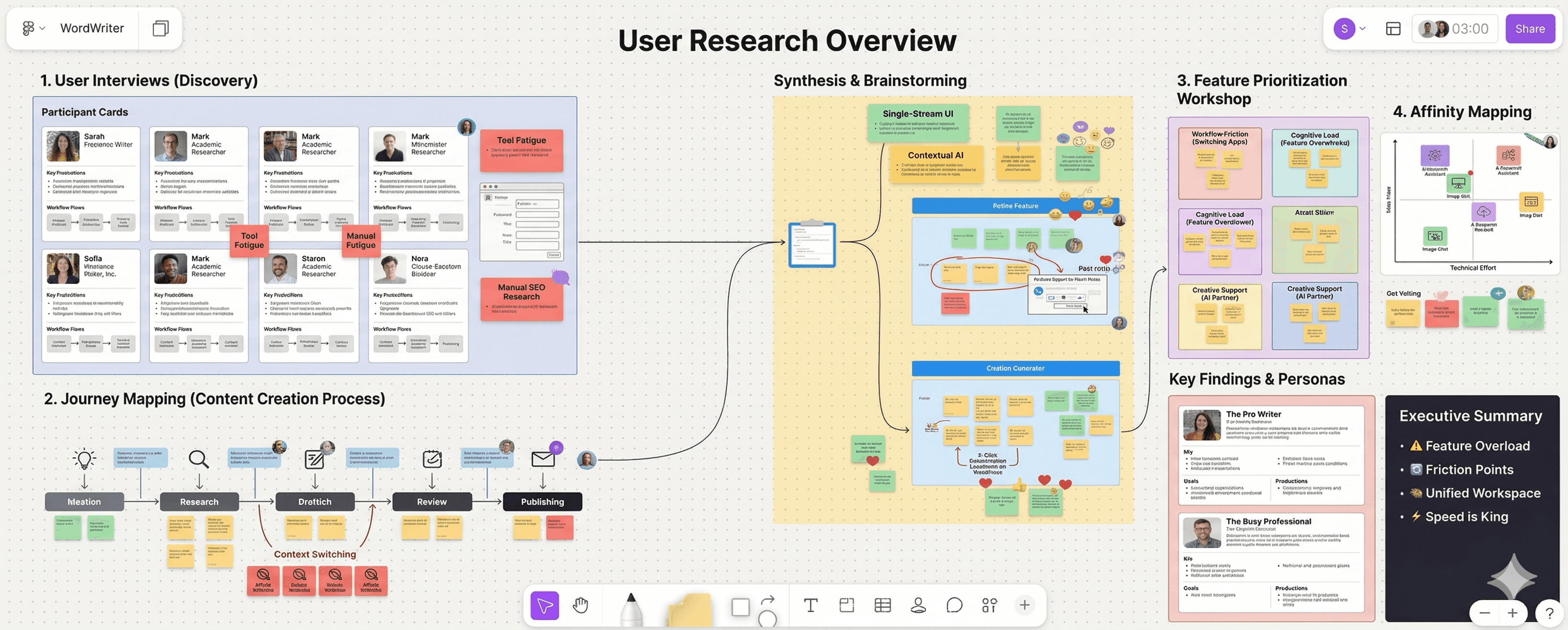
I analyzed competitor writing platforms and AI design systems, studied WordWriter’s core user base of professionals and creators, uncovered ways of blending WordWriter’s unique AI capabilities into a cohesive UI without compromising aesthetic style, and reviewed industry reports on the evolving landscape of AI-assisted content creation and design system competition.
Defining the Experience
Platform Audit
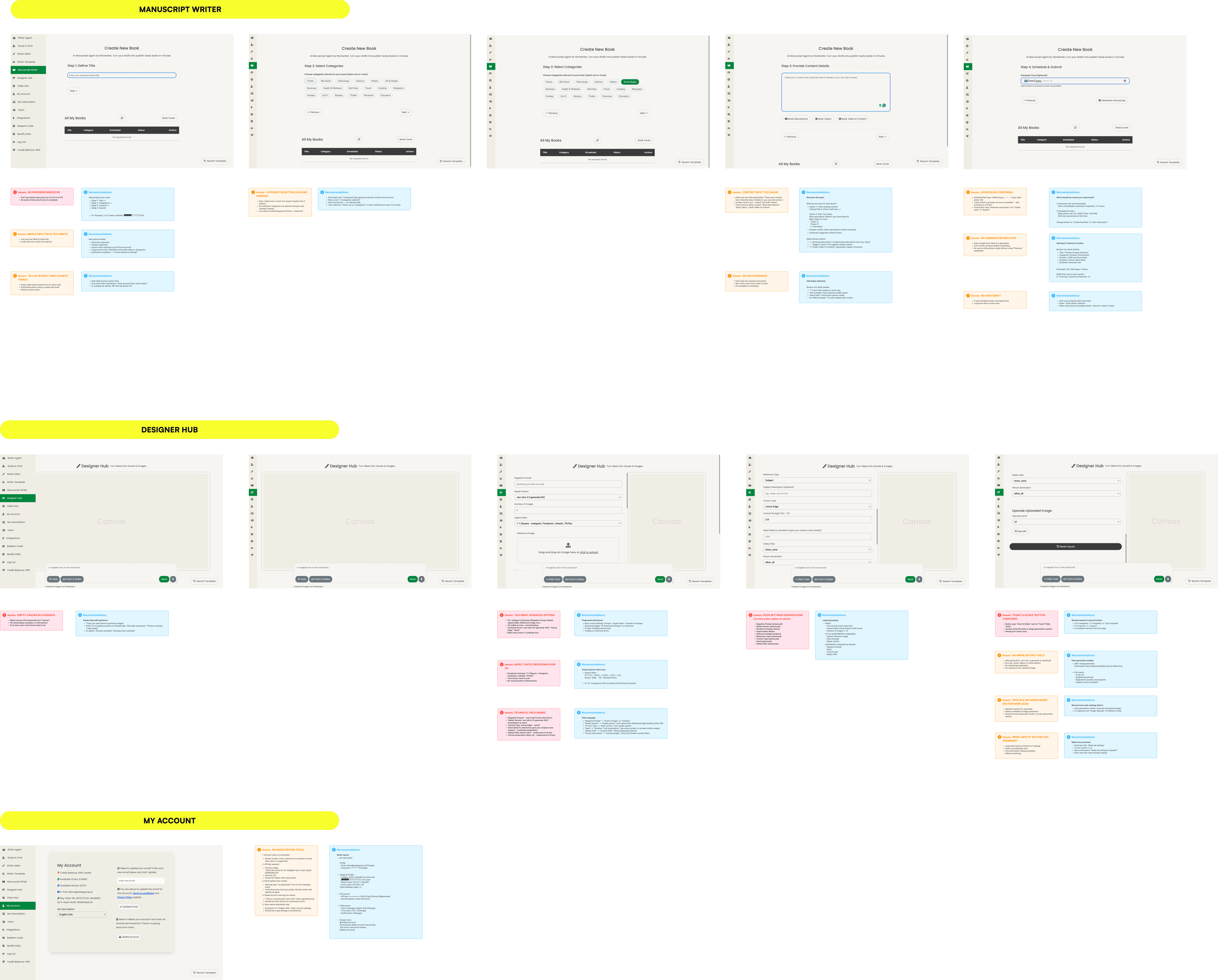
Our platform audit evaluated WordWriter’s UI against industry standards, uncovering that poor categorization of its 100+ templates led to significant feature blindness. By mapping the end-to-end journey, we identified critical navigation "dead ends" where users abandoned tasks due to high cognitive load. These findings provided a direct blueprint for transitioning to a unified, single-stream workspace that eliminates friction and surface-level clutter.
Inspiration & Experience Boards
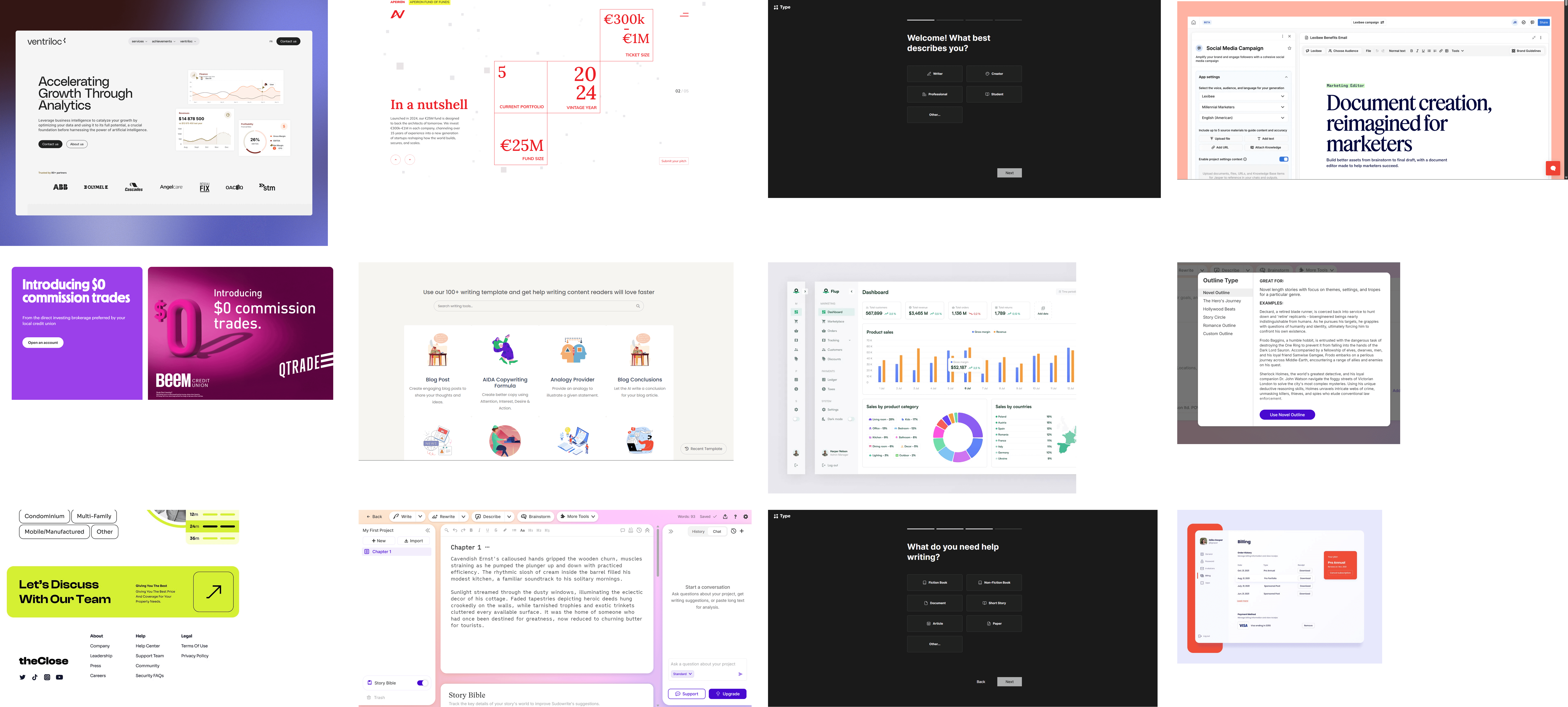
I created Inspiration and Experience Boards to explore how visual elements could shape the website experience.
We opted for a modern yet creatively exciting direction, balancing clarity and credibility with an engaging, approachable feel.
Expressive Ideation

Visual Design Concepts
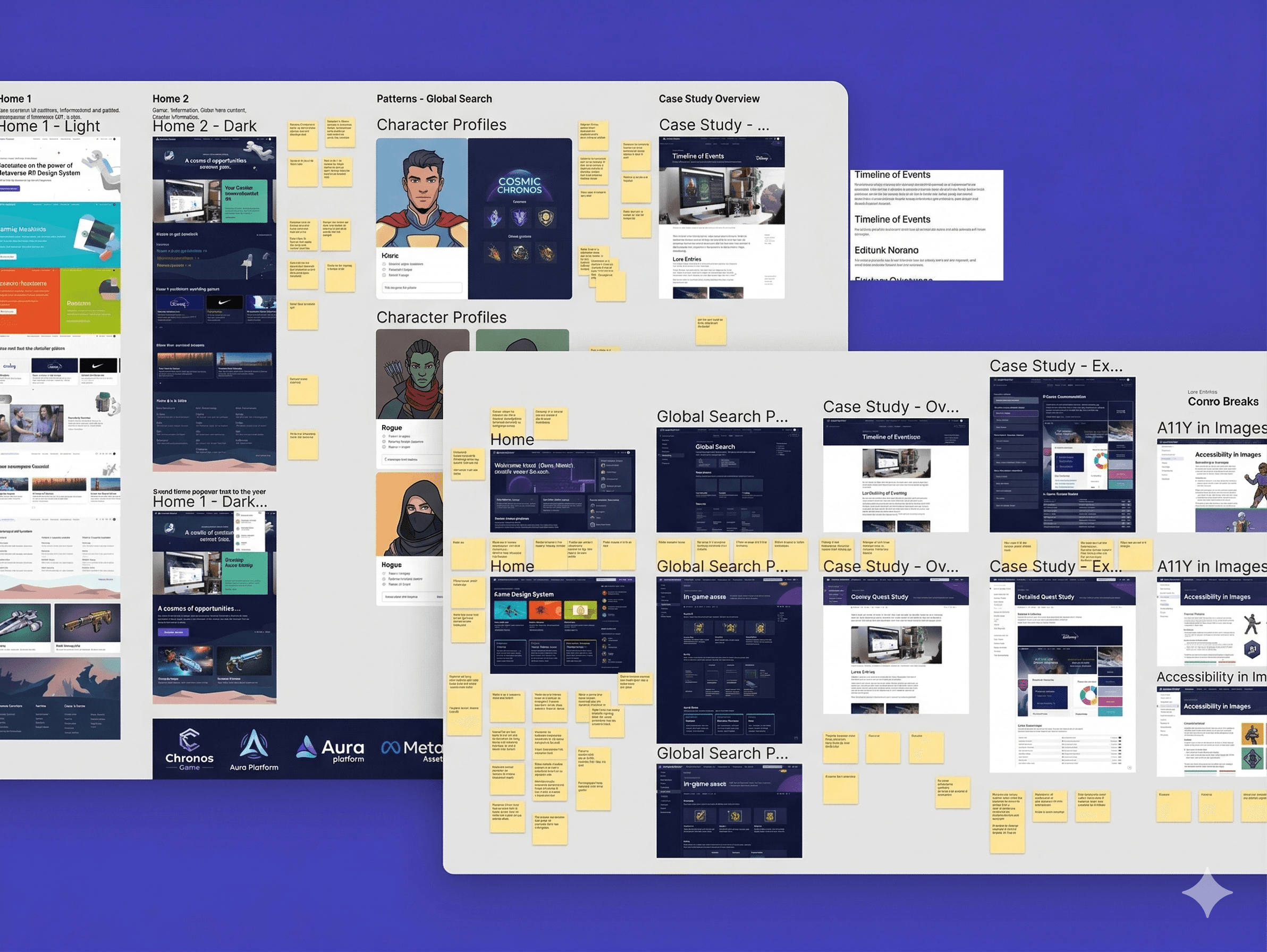
Drawing from user insights and product goals, I developed visual design concepts and refined them through iterative reviews. I explored different layout structures, typography systems, and interaction patterns to support focused writing, while testing color schemes and styles to achieve a clear, modern, and distraction-free experience.
Iterations
Design & Refine
Branding + Design System
After defining the visual direction, I used ChadCN as the framework to build and brand SalesGroup’s design system.
I polished components, established visual styles, and structured reusable elements, creating a scalable foundation for prototyping and ensuring consistency across the website experience.
Landing Pages
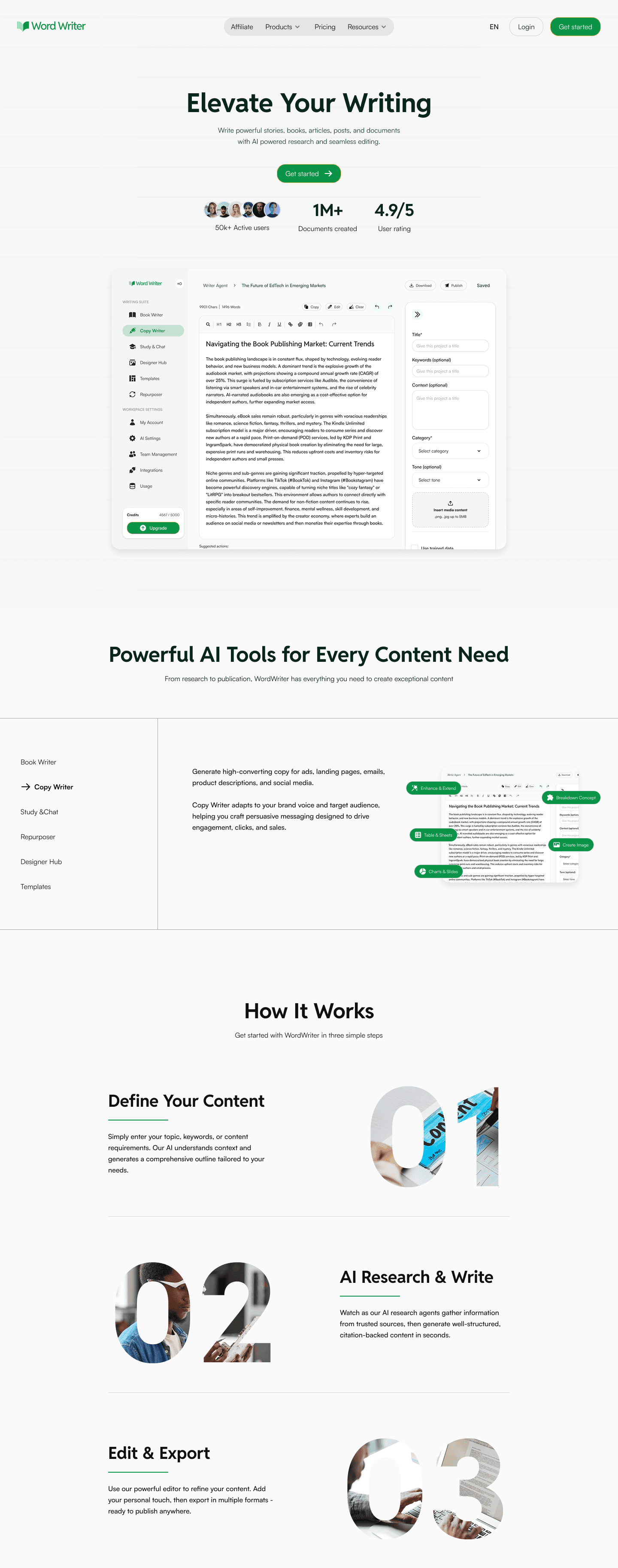
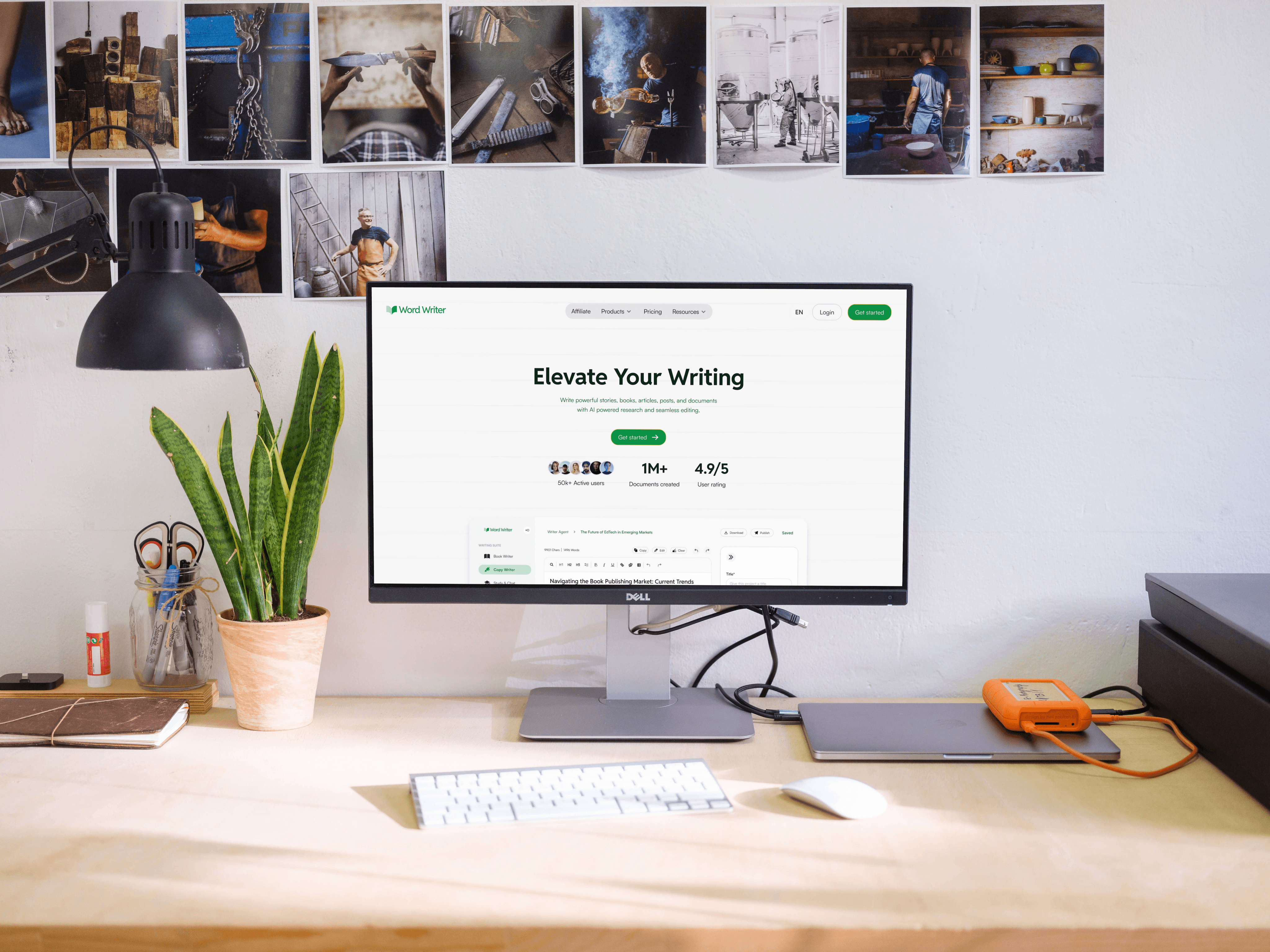
I designed WordWriter’s landing pages to clearly communicate its value as an all-in-one AI writing tool, guiding users through key capabilities like research, writing, editing, and image creation.
I structured content hierarchies, refined messaging, and crafted CTAs to create a focused, intuitive journey that helps users quickly understand the product and start writing with confidence.

intuitive design
Dashboard
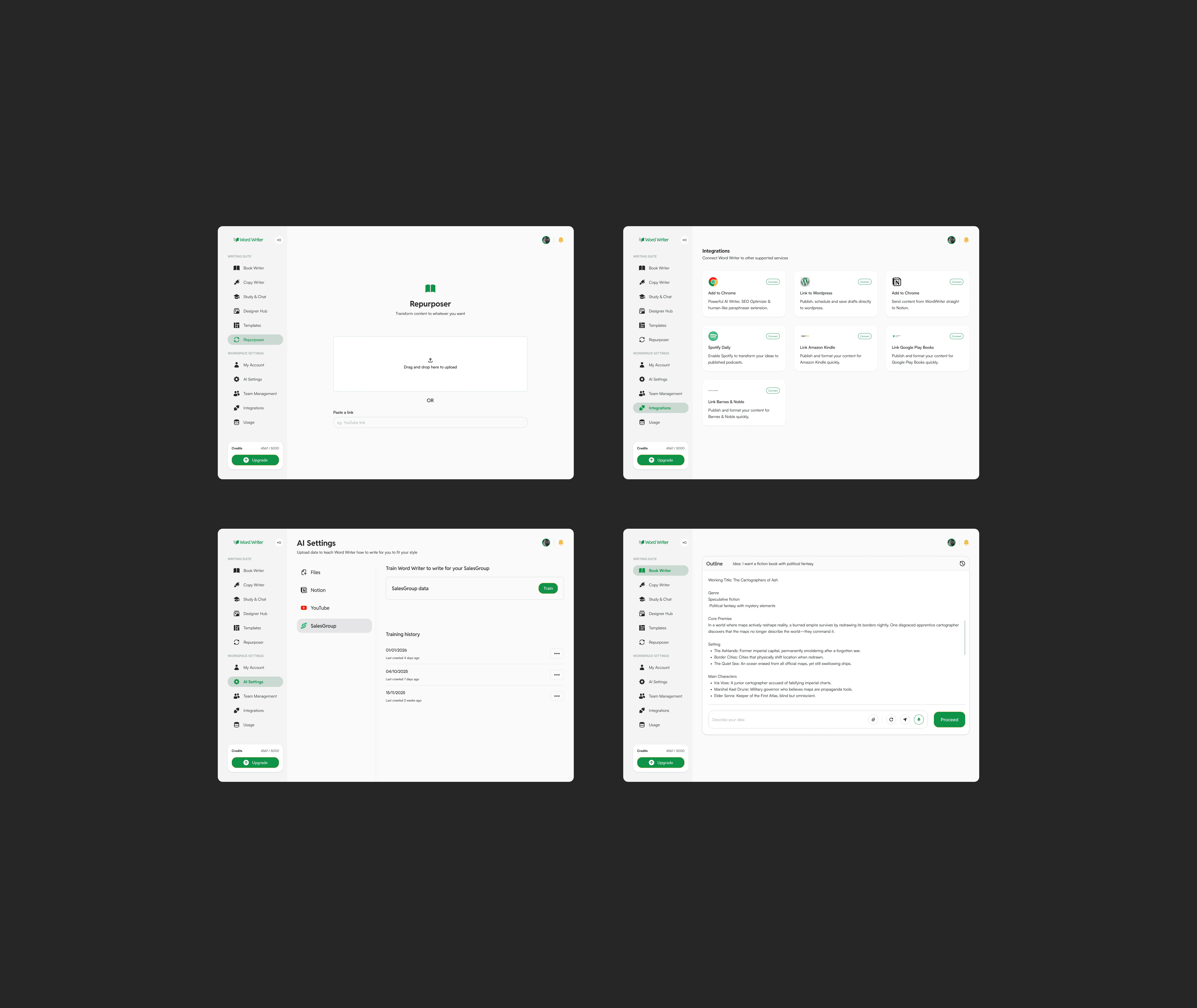
I designed WordWriter’s dashboard to provide a clear, focused workspace where users can manage their documents, track progress, and quickly resume writing. Key elements were structured to support continuity, giving users easy access to drafts, recent activity, and ongoing projects.
I also designed the AI assistant interface, ensuring seamless interactions that help users generate ideas, refine content, and stay in flow throughout the writing process.
Prototyping & Motion
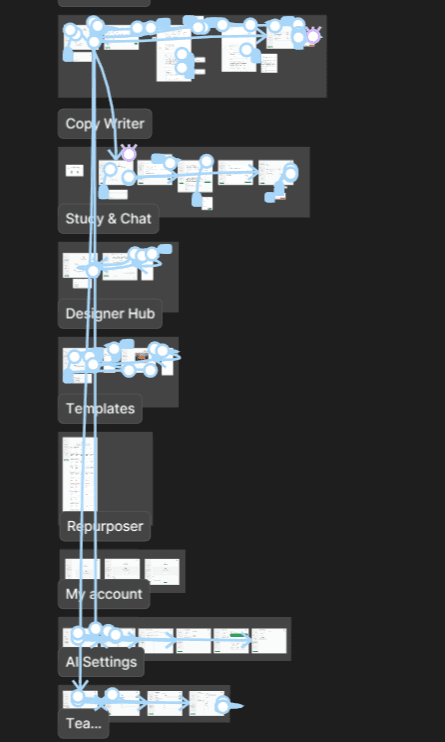
Interactive prototypes for the Wordwriter Product showcased motion, interactions, and key features like hover states and animations, giving stakeholders a clear, tangible vision of the final experience.
The Solution
We delivered a cohesive, user-focused writing platform that clearly positions WordWriter as an all-in-one AI workspace for content creation. The redesign unified fragmented features into a streamlined experience, guiding users from idea to polished output across research, writing, editing, and image generation. By simplifying workflows and establishing a clear product structure, the platform now offers an intuitive, focused environment that improves usability, strengthens engagement, and enables users to produce high-quality content efficiently.
deliverables
Improved Product Look & Feel
A cohesive design language and component system to unify WordWriter’s interface and create a clear, distraction-free writing experience.
Writing Workspace & Dashboard Designs
High-fidelity designs for the core writing interface, dashboard, and AI assistant interactions.
Clear Interactive Prototype
A clickable prototype showcasing key user flows, writing interactions, and the overall product experience from ideation to final output.
Design Documentation & Guidelines
Comprehensive guidelines for typography, color, components, and interactions to ensure consistency and scalability across the platform.
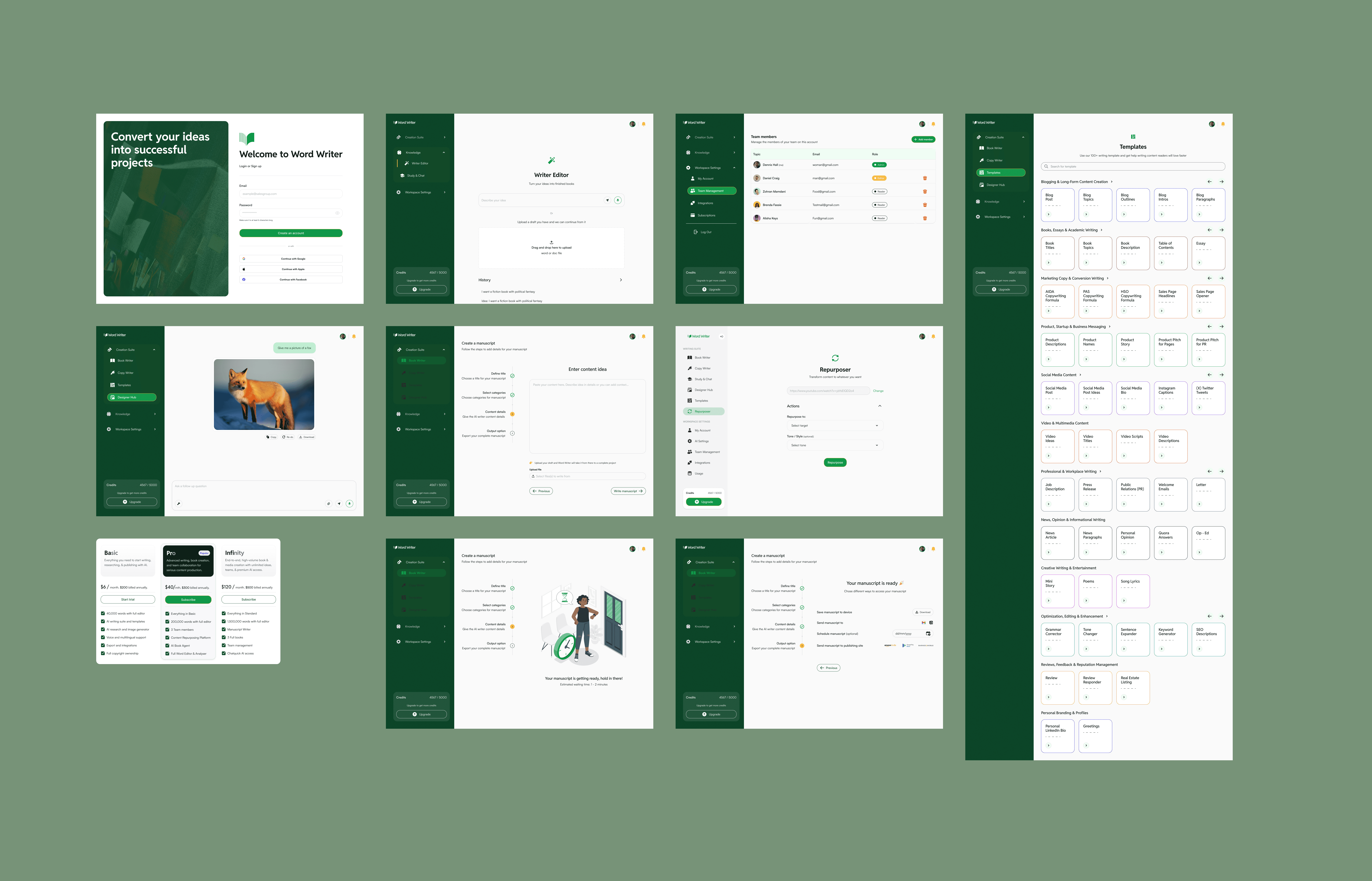
Final Screen Designs
Core high fidelity screens for the WordWriter Platform

Impactful Results
Improved User Experience
The redesigned platform delivers a clear, intuitive writing experience, making it easier for users to navigate, focus, and move from ideas to finished content.
Consistent Visual Language
A unified design system across the writing workspace, dashboard, and AI assistant creates a cohesive and professional product experience.
Enhanced Engagement
Streamlined workflows and guided interactions keep users in flow, improving how they write, edit, and complete content.
Product & Stakeholder Value
Delivered a scalable, well-structured product that aligns with business goals, simplifies the offering, and sets a strong foundation for future growth.

More Projects
WordWriter
Designing an AI-Powered Writing Assistant for High-Quality Book writing and Content Creation
Year :
2026
Role:
Product Design
Industry :
Writing
Client :
DroveMedia
Overview
I undertook the redesign of WordWriter’s core product experience, creating an AI-powered writing workspace that guides users from ideas and rough drafts to fully polished stories, articles, and business copy. The result is a seamless, all-in-one platform that combines research, writing, editing, and image generation, enabling users to produce complete, high-quality content without leaving the tool.
Background
WordWriter is an AI-powered writing tool built to help writers and busy professionals move from raw ideas and rough drafts to fully polished stories, books, articles, posts, and business copy. It combines AI-driven research, seamless editing, and integrated image generation into a single, streamlined workspace, enabling users to create high-quality content without switching tools.
Redesigned for speed, clarity, and creative control, WordWriter simplifies the writing process from ideation to final output, making it easier to produce compelling, complete work efficiently.
Design Process
Discover
Competitive Research
User Research
Define
Information Architecture
Wireframing
Inspiration + Experience
Ideate
Visual Design Concepts
UI/UX Iteration
Prototyping
Design
Illustration Updates
UI/UX Refinement
Prototyping
Problem Statement
Writers and busy professionals often struggle to move from scattered ideas and rough drafts to fully polished, high-quality content due to fragmented workflows across multiple tools for research, writing, editing, and visual creation. This constant context switching increases cognitive load, slows down output, and breaks creative flow, making it difficult to consistently produce compelling stories, articles, and business copy efficiently. Existing writing tools either lack depth in research and editing capabilities or fail to provide an integrated, end-to-end experience, leaving users without a clear, streamlined path from ideation to completion.
Challenges
Fragmented and incoherent feature set
The product had too many poorly named and loosely structured features, making it difficult for users to understand what each tool did or how they fit together.
Lack of user-centric foundation
The experience wasn’t built with writers in mind, resulting in workflows that didn’t align with how users actually think, write, and refine content.
Disjointed end-to-end workflow
Research, drafting, editing, and image creation existed in isolation, forcing users to piece together their workflow manually.
High cognitive load for new users
An overload of options and unclear starting points made it difficult for new users to quickly understand how to begin or get value.
Project Objectives
Objectives
Build a user-centered product for writers
Design workflows around real writing behaviors, ensuring the platform supports creativity, efficiency, and professional output.
Simplify and rationalize features
Combine overlapping tools and remove unnecessary ones to create a clear, coherent product offering that’s easy to understand and use.
Establish a coherent design language
Develop consistent visual and interaction patterns across the platform to make the experience intuitive, familiar, and visually unified.
Streamline the writing workflow
Connect research, drafting, editing, and image creation into a seamless, end-to-end experience that guides users from idea to polished content.
DISCOVER
User & Competitive Research
I analyzed competitor writing platforms and AI design systems, studied WordWriter’s core user base of professionals and creators, uncovered ways of blending WordWriter’s unique AI capabilities into a cohesive UI without compromising aesthetic style, and reviewed industry reports on the evolving landscape of AI-assisted content creation and design system competition.
Defining the Experience
Platform Audit
Our platform audit evaluated WordWriter’s UI against industry standards, uncovering that poor categorization of its 100+ templates led to significant feature blindness. By mapping the end-to-end journey, we identified critical navigation "dead ends" where users abandoned tasks due to high cognitive load. These findings provided a direct blueprint for transitioning to a unified, single-stream workspace that eliminates friction and surface-level clutter.
Inspiration & Experience Boards
I created Inspiration and Experience Boards to explore how visual elements could shape the website experience.
We opted for a modern yet creatively exciting direction, balancing clarity and credibility with an engaging, approachable feel.
Expressive Ideation
Visual Design Concepts
Drawing from user insights and product goals, I developed visual design concepts and refined them through iterative reviews. I explored different layout structures, typography systems, and interaction patterns to support focused writing, while testing color schemes and styles to achieve a clear, modern, and distraction-free experience.
Iterations
Design & Refine
Branding + Design System
After defining the visual direction, I used ChadCN as the framework to build and brand SalesGroup’s design system.
I polished components, established visual styles, and structured reusable elements, creating a scalable foundation for prototyping and ensuring consistency across the website experience.
Landing Pages
I designed WordWriter’s landing pages to clearly communicate its value as an all-in-one AI writing tool, guiding users through key capabilities like research, writing, editing, and image creation.
I structured content hierarchies, refined messaging, and crafted CTAs to create a focused, intuitive journey that helps users quickly understand the product and start writing with confidence.
intuitive design
Dashboard
I designed WordWriter’s dashboard to provide a clear, focused workspace where users can manage their documents, track progress, and quickly resume writing. Key elements were structured to support continuity, giving users easy access to drafts, recent activity, and ongoing projects.
I also designed the AI assistant interface, ensuring seamless interactions that help users generate ideas, refine content, and stay in flow throughout the writing process.
Prototyping & Motion
Interactive prototypes for the Wordwriter Product showcased motion, interactions, and key features like hover states and animations, giving stakeholders a clear, tangible vision of the final experience.
The Solution
We delivered a cohesive, user-focused writing platform that clearly positions WordWriter as an all-in-one AI workspace for content creation. The redesign unified fragmented features into a streamlined experience, guiding users from idea to polished output across research, writing, editing, and image generation. By simplifying workflows and establishing a clear product structure, the platform now offers an intuitive, focused environment that improves usability, strengthens engagement, and enables users to produce high-quality content efficiently.
deliverables
Improved Product Look & Feel
A cohesive design language and component system to unify WordWriter’s interface and create a clear, distraction-free writing experience.
Writing Workspace & Dashboard Designs
High-fidelity designs for the core writing interface, dashboard, and AI assistant interactions.
Clear Interactive Prototype
A clickable prototype showcasing key user flows, writing interactions, and the overall product experience from ideation to final output.
Design Documentation & Guidelines
Comprehensive guidelines for typography, color, components, and interactions to ensure consistency and scalability across the platform.
Final Screen Designs
Core high fidelity screens for the WordWriter Platform
Impactful Results
Improved User Experience
The redesigned platform delivers a clear, intuitive writing experience, making it easier for users to navigate, focus, and move from ideas to finished content.
Consistent Visual Language
A unified design system across the writing workspace, dashboard, and AI assistant creates a cohesive and professional product experience.
Enhanced Engagement
Streamlined workflows and guided interactions keep users in flow, improving how they write, edit, and complete content.
Product & Stakeholder Value
Delivered a scalable, well-structured product that aligns with business goals, simplifies the offering, and sets a strong foundation for future growth.
More Projects
WordWriter
Designing an AI-Powered Writing Assistant for High-Quality Book writing and Content Creation
Year :
2026
Role:
Product Design
Industry :
Writing
Client :
DroveMedia
Overview
I undertook the redesign of WordWriter’s core product experience, creating an AI-powered writing workspace that guides users from ideas and rough drafts to fully polished stories, articles, and business copy. The result is a seamless, all-in-one platform that combines research, writing, editing, and image generation, enabling users to produce complete, high-quality content without leaving the tool.
Background
WordWriter is an AI-powered writing tool built to help writers and busy professionals move from raw ideas and rough drafts to fully polished stories, books, articles, posts, and business copy. It combines AI-driven research, seamless editing, and integrated image generation into a single, streamlined workspace, enabling users to create high-quality content without switching tools.
Redesigned for speed, clarity, and creative control, WordWriter simplifies the writing process from ideation to final output, making it easier to produce compelling, complete work efficiently.
Design Process
Discover
Competitive Research
User Research
Define
Information Architecture
Wireframing
Inspiration + Experience
Ideate
Visual Design Concepts
UI/UX Iteration
Prototyping
Design
Illustration Updates
UI/UX Refinement
Prototyping
Problem Statement
Writers and busy professionals often struggle to move from scattered ideas and rough drafts to fully polished, high-quality content due to fragmented workflows across multiple tools for research, writing, editing, and visual creation. This constant context switching increases cognitive load, slows down output, and breaks creative flow, making it difficult to consistently produce compelling stories, articles, and business copy efficiently. Existing writing tools either lack depth in research and editing capabilities or fail to provide an integrated, end-to-end experience, leaving users without a clear, streamlined path from ideation to completion.
Challenges
Fragmented and incoherent feature set
The product had too many poorly named and loosely structured features, making it difficult for users to understand what each tool did or how they fit together.
Lack of user-centric foundation
The experience wasn’t built with writers in mind, resulting in workflows that didn’t align with how users actually think, write, and refine content.
Disjointed end-to-end workflow
Research, drafting, editing, and image creation existed in isolation, forcing users to piece together their workflow manually.
High cognitive load for new users
An overload of options and unclear starting points made it difficult for new users to quickly understand how to begin or get value.
Project Objectives
Objectives
Build a user-centered product for writers
Design workflows around real writing behaviors, ensuring the platform supports creativity, efficiency, and professional output.
Simplify and rationalize features
Combine overlapping tools and remove unnecessary ones to create a clear, coherent product offering that’s easy to understand and use.
Establish a coherent design language
Develop consistent visual and interaction patterns across the platform to make the experience intuitive, familiar, and visually unified.
Streamline the writing workflow
Connect research, drafting, editing, and image creation into a seamless, end-to-end experience that guides users from idea to polished content.
DISCOVER
User & Competitive Research
I analyzed competitor writing platforms and AI design systems, studied WordWriter’s core user base of professionals and creators, uncovered ways of blending WordWriter’s unique AI capabilities into a cohesive UI without compromising aesthetic style, and reviewed industry reports on the evolving landscape of AI-assisted content creation and design system competition.
Defining the Experience
Platform Audit
Our platform audit evaluated WordWriter’s UI against industry standards, uncovering that poor categorization of its 100+ templates led to significant feature blindness. By mapping the end-to-end journey, we identified critical navigation "dead ends" where users abandoned tasks due to high cognitive load. These findings provided a direct blueprint for transitioning to a unified, single-stream workspace that eliminates friction and surface-level clutter.
Inspiration & Experience Boards
I created Inspiration and Experience Boards to explore how visual elements could shape the website experience.
We opted for a modern yet creatively exciting direction, balancing clarity and credibility with an engaging, approachable feel.
Expressive Ideation
Visual Design Concepts
Drawing from user insights and product goals, I developed visual design concepts and refined them through iterative reviews. I explored different layout structures, typography systems, and interaction patterns to support focused writing, while testing color schemes and styles to achieve a clear, modern, and distraction-free experience.
Iterations
Design & Refine
Branding + Design System
After defining the visual direction, I used ChadCN as the framework to build and brand SalesGroup’s design system.
I polished components, established visual styles, and structured reusable elements, creating a scalable foundation for prototyping and ensuring consistency across the website experience.
Landing Pages
I designed WordWriter’s landing pages to clearly communicate its value as an all-in-one AI writing tool, guiding users through key capabilities like research, writing, editing, and image creation.
I structured content hierarchies, refined messaging, and crafted CTAs to create a focused, intuitive journey that helps users quickly understand the product and start writing with confidence.
intuitive design
Dashboard
I designed WordWriter’s dashboard to provide a clear, focused workspace where users can manage their documents, track progress, and quickly resume writing. Key elements were structured to support continuity, giving users easy access to drafts, recent activity, and ongoing projects.
I also designed the AI assistant interface, ensuring seamless interactions that help users generate ideas, refine content, and stay in flow throughout the writing process.
Prototyping & Motion
Interactive prototypes for the Wordwriter Product showcased motion, interactions, and key features like hover states and animations, giving stakeholders a clear, tangible vision of the final experience.
The Solution
We delivered a cohesive, user-focused writing platform that clearly positions WordWriter as an all-in-one AI workspace for content creation. The redesign unified fragmented features into a streamlined experience, guiding users from idea to polished output across research, writing, editing, and image generation. By simplifying workflows and establishing a clear product structure, the platform now offers an intuitive, focused environment that improves usability, strengthens engagement, and enables users to produce high-quality content efficiently.
deliverables
Improved Product Look & Feel
A cohesive design language and component system to unify WordWriter’s interface and create a clear, distraction-free writing experience.
Writing Workspace & Dashboard Designs
High-fidelity designs for the core writing interface, dashboard, and AI assistant interactions.
Clear Interactive Prototype
A clickable prototype showcasing key user flows, writing interactions, and the overall product experience from ideation to final output.
Design Documentation & Guidelines
Comprehensive guidelines for typography, color, components, and interactions to ensure consistency and scalability across the platform.
Final Screen Designs
Core high fidelity screens for the WordWriter Platform
Impactful Results
Improved User Experience
The redesigned platform delivers a clear, intuitive writing experience, making it easier for users to navigate, focus, and move from ideas to finished content.
Consistent Visual Language
A unified design system across the writing workspace, dashboard, and AI assistant creates a cohesive and professional product experience.
Enhanced Engagement
Streamlined workflows and guided interactions keep users in flow, improving how they write, edit, and complete content.
Product & Stakeholder Value
Delivered a scalable, well-structured product that aligns with business goals, simplifies the offering, and sets a strong foundation for future growth.